
Your Simulation, Your Way
Every course is different. With Marketplace Simulations, you can adapt the experience to fit your timeline, course format, approach to AI, and assessment needs. Explore your options.
Match Your Simulation to Your Course Length
Full or Half Semester Simulation
There are a variety of ways to use business simulations in a semester-long class:
- Assign it during the first half of the semester to give new students a taste of business.
- Place it in the second half of the semester so students can apply what they’ve learned.
- Make it a semester-long assignment, and watch students improve as they learn.
Most professors assign one decision round per week, giving students 4 to 12 weeks in total. The class becomes a mixture of lectures and simulation activity. Each week, one lecture or lab period can be set aside for team decision-making or one-on-one coaching with the instructor.
Self-Paced Simulation
A self-paced simulation is ideal for large classes and individual learning. Each student or team works in an independent simulated business world. Instead of competing against classmates, they play against computer teams. The teams are engineered to give learners an appropriate challenge without overwhelming them.
This format requires the least coordination for you as the instructor. Students work at their own pace, eliminating wait times and the need to coordinate student progress. They can take more time as needed and move on as soon as they complete a decision round.
Intensive Simulation
An intensive simulation format is ideal for quick and deep learning. Students complete the entire business simulation in just one to 10 days. This format fits a wide range of scenarios:
- Use it as a capstone experience.
- Assign it midway through the program to let students integrate what they’ve learned before transitioning to their concentrations.
- Make it the core assignment in a mini-semester course.
- Start your program with a simulation intensive, giving students a benchmark to see how they’ve grown by the end of the program.
Total immersion in the simulation provides immediate feedback, encouraging critical thinking and agility.
Facilitate a Simulation in Any Class Format
No matter what format you teach in, Marketplace Simulations are designed to fit your needs. Our team can even help you adapt your in-person class to an online format or vice versa.

In Person: Assign your business simulation as homework or give students lab hours to work as teams. Class lectures take on new relevance as students apply lessons to their businesses, and it becomes easy to prompt lively class discussions.

Online: Our browser-based simulations give your class a shared experience that fosters connection, team-building, and discussions. You’ll also gain insights into your students’ strengths and weaknesses, making you a more effective mentor.

Hybrid: Marketplace simulations provide an immersive learning experience that is equally accessible to in-person and online students. The competition also creates excitement around in-person gatherings as students get to meet their competitors.

Flipped Classroom: Marketplace Microsimulations teach core business concepts in 30 minutes or less. Assign them as lecture content outside of the classroom, and let students come to class with their questions or reflections. Microsimulations are included for free in each of our competitive simulations.
Inside Online Classes

Case Study: Teaching Online and In Person
Every semester, Dr. John Eaton offers his class to 1,200 students in three formats: in-person, condensed, and online. Learn how he uses Marketplace Simulations to give every student a quality, connected experience. Read the case study.
Choose Who Students Play Against

Play Against Classmates
Nothing engages students like live competition. The friendly rivalry creates a stimulating and engaging experience—with wholly unpredictable results. Because students compete against their classmates, all teams advance through the game in sync.
This option is ideal for small to large classes with 3–5 students per team. Playing in teams cultivates soft skills such as leadership and communication.

Play Against the Computer
Simplify the simulation experience by letting students play against the computer. Computer teams provide a realistic competitive experience while also giving your flexibility with timelines. You can set deadlines for each quarter or let students work at their own pace.
This option works with all class sizes and is ideal for very large (1,000+) classes. Assign students to teams of 3–5 or let them play individually.
Engage Students with Marketplace Coaching Tools
Our coaching tools are designed to spur critical thinking in students and empower you as an instructor. Equip your course with a variety of AI and non-AI tools.

AI Coach: Give students 24/7 support with our AI Coach. It explains simulation mechanics and business concepts, helping students understand the tasks in front of them before they make decisions.

AI Tactical Plan Reviewer: This AI tool acts as an experienced board member. It reviews each team’s tactical plan and asks thoughtful questions, encouraging them to rethink weak assumptions or unsupported forecasts.

Automated Coaching Assistant: Make every conversation count with our Automated Coaching Assistant. It analyzes student decisions and generates discussion points to help you target students’ victories, failures, and thought processes.

Live, Human Support: Our support team is available to professors 24/7 and to students seven days a week. We can answer technical questions, help you navigate class challenges, and make sure students understand the tasks they need to complete.
Track Student Growth with Assessments
Customized Objective Learning Assessment
Measure how well your students perceive, comprehend, and predict business conditions. This closed-book assessment generates unique questions for each team based on their position within the simulation.
Career Readiness Reports
Evaluate students’ competencies based on their decisions and outcomes in the simulation. Our software compares them to other learners around the world to determine their standout strengths and where they need to grow.
Knowledge Checks
Simulation Knowledge Checks are open-book quizzes with seven to 10 questions about the elements of the simulations. Find out if your students understand the nuances of the market, the data presented to them, and the actions they should take to improve.
Automated Grading
Automated grading is based on each team’s cumulative balanced scorecard results in the simulation. Pick from three levels of grading difficulty and manually adjust grades on a student or team basis. Students will not see their grades until you release them.
Peer Evaluations
See students’ performance from their classmates’ perspectives. You can use Marketplace Peer Evaluations throughout the business simulation to gauge each student’s involvement, in addition to our built-inactivity tracker.
Explore Simulation Scenarios
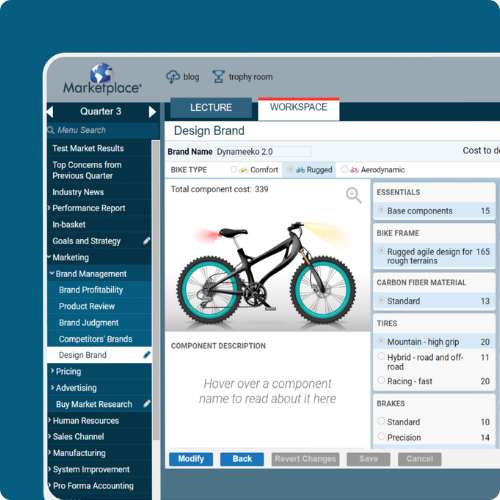
Carbon Fiber Bikes
Advanced 3D printing technology has made it possible to print custom carbon fiber bikes. The new technology will cut costs substantially, allowing the new bikes to be priced well below other carbon fiber bikes. Students receive seed capital to develop this new, niche market.
As they compete for market dominance, students will take on challenges like designing brands, building a production facility, hiring workers, opening stores, launching advertising campaigns and more.
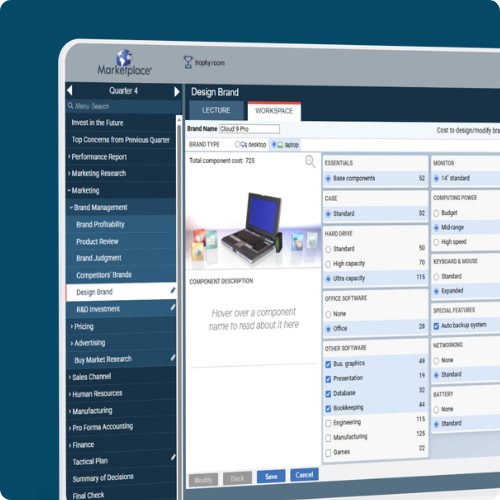
Personal Computers
In our classic PC scenario, students step into the early days of the personal computer market. Students will receive seed capital to start their business selling laptops, desktop computers, or both!
As they build their business, students will take on challenges like building a factory, opening distribution channels, designing brands, launching advertising campaigns and more.